Intro to AJAX
Objectives
- Define AJAX
- Describe the purpose of AJAX
- Utilize AJAX to fetch data from third-party APIs
- Understand the place of AJAX in the request-response cycle
- Describe how promises work in the context of AJAX requests
Ajax (Asynchronous JavaScript and XML) is used to create asynchronous web applications. This simply means a web page that can make calls back to the server in the background.
Understanding HTTP
Before we can understand AJAX we need to a little background on HTTP. HTTP is one of many internet protocols and is the protocol used for web communcation. HTTP can only send TEXT and is a request-response protocol. This means that a server can only respond to a request from a client (usually a web browser). Read more on wiki.

AJAX
Originally the only way an HTTP request could be initiated was if the user clicked a link on a webpage, or submitted a form. AJAX allows JavaScript to send requests to the server with or without user interaction. This enables page content to be updated dynamically without a full page refresh.
AJAX in jQuery
For information about AJAX in jQuery, the best place to go is the jQuery AJAX Documentation.
The most common methods are $.get() and $.post(). There's also a method called $.ajax(), which allows additional options to be passsed to the request.
To make our AJAX request, we have to tell the server what we want in our HTTP request. This is done by passing in an object.
Basic $.get() example
$.get('https://www.reddit.com/search.json', {
  q: 'kittens'
}).done(function(data) {
  console.log(data);
});
This $.ajax() example is the same as the $.get() example above
$.ajax({
  url: 'https://www.reddit.com/search.json',
  method: 'GET',
  data: {
    q: 'kittens'
  }
}).done(function(data) {
  console.log(data);
});
Note how in the $.ajax() example, we need to be more explicit by providing an object with the url, method, and data. Using $.get() will assume that the first argument is the URL and the second argument is data we want to send via the query string.
AJAX is asynchronous
An AJAX request doesn't allow you to load things instantly. Requesting things over the network always takes time, and you need an event handler to deal with the results. Look at the following code:
console.log('Document is ready');

$.get('https://www.reddit.com/search.json', {
  q: 'kittens'
}).done(function(data) {
  console.log('AJAX is ready');
});

console.log('Just fired AJAX request!');
What order will the console.log statements appear?
AJAX Data and Scope
What if we want to use data from an AJAX request? We'll need to keep variable scope in mind, i.e. where do the variables exist?
Many AJAX requests produce local variables. This means that it can be challenging to use these variables outside of our callback functions
Some examples:
This code causes an error because posts only exists inside the immediate function its declared in
$.get('https://www.reddit.com/search.json', {
  q: 'kittens'
}).done(function(data) {
  var posts = data;
});

console.log(posts);

// Output
// > Uncaught ReferenceError: posts is not defined(…)
This code runs because posts is declared in the same scope as data.
$.get('https://www.reddit.com/search.json', {
  q: 'kittens'
}).done(function(data) {
  var posts = data;
  console.log(posts);
});

// Output
// > Object {kind: "Listing", data: Object}
Promises
Note that at the end of the AJAX request, there is a function called .done() that is called once the response has been received. This is an example of a promise. Promises are common concepts in JavaScript, and you can think of promises as a "contract" between two functions. When the .done() promise is attached to the AJAX function, it "promises" to run once the response comes back successful. This is due to the request-response cycle taking time, and requiring asynchronous behavior.
We can chain additional promises to the AJAX request, and this is a common practice. However, the "contract" still applies. Let's see an example.
$.get('https://www.reddit.com/thispagedoesntexist').done(function(data) {
  console.log('This should not run, because a 404 error occurs');
}).fail(function(error) {
  console.log('An error occurred');
});
Here, we added a second promise called .fail(). Try running the code above by pasting it into the Chrome console on https://www.reddit.com, and see what happens. Only the .fail() function runs, and that's because the .fail() function makes a promise to the AJAX function that it will only run when there's an error.
Since the .done() function made a promise to the AJAX function to only run when successful, the .done() function does not run, thus keeping its promise. Keep a lookout for promises implemented in the context of AJAX and other libraries.
Putting AJAX On the Page
It's no fun simply logging search results to the page. Let's put content on the page!
Fork this repo (AJAX Reddit Search) and pull it down to your own computer. The page has a basic search box set up and already includes AJAX code that will search for kittens on reddit. We need to process the AJAX response and create elements to add to the DOM to display the results on the page.
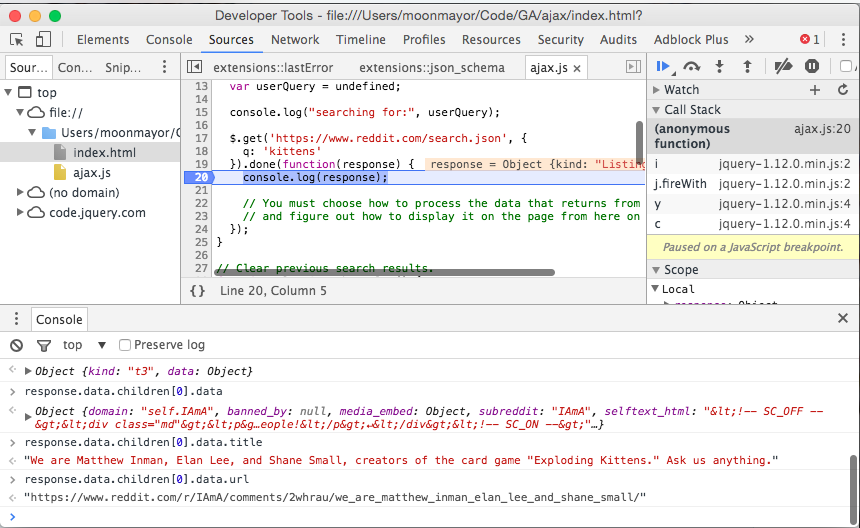
AJAX responses are usually deeply nested objects carry lots of information. We can look at an API to see what the response is supposed to look like. Orrr, we can set a breakpoint at the point when data arrives and use our debugger to play around with the object and see what data comes back.
The console.log() statement printing the response allows us to use our mouse to click on
properties of the object and investigate them. Pausing the debugger at the point when
the response arrives allows us to interact with the console when the response variable
is in scope. We can write commands on the console to see if they work and copy and paste
valid code back into our program.
Remember, we have two ways to set breakpoints. We can write the debugger keyword
in our program when we want the program to stop. Or, we can look at the source in Chrome's
Developer Tools and click on a line to tell the browser to stop there.
Adding a console.log() will print the response every time, and gives us a line number to
click on. We can follow the link to the line number and click on that line to set a
temporary breakpoint manually.
Using the debugger keyword will stop our program every time. It won't output anything
to the console so we won't be able to see data once we're past that point of execution.
Take a moment to work in groups to write the pros and cons of both console.log statements
and using the debugger keyword.
Use your debugging tools to investigate the response object and find out how to access the title and the url of the first result. Copy and paste parts of this line of code into your program so you have easy access to the important parts of your search results.
Consider how the forEach and map functions may be useful tools to process
this complicated objects.
Now you know how to access information you want to display on the page. Find a way
to use and modify the provided `addSearchResult function to get search results
to display on the page.
Now you're cooking with gas.
APIs to hit
Here are a few APIs you can use to practice AJAX calls. They either won't save changes, or won't allow you to use POST, PUT or DELETE, so they're safe to play with.
General Assembly's Doughnuts API
Cross-Origin Requests
Note that not all websites/APIs play nice with AJAX. You may see an error in the console from APIs like the iTunes API
$.get('http://itunes.apple.com/search?term=arcade+fire').done(function(data) {
  console.log(data);
});

// output
// > No 'Access-Control-Allow-Origin' header is present on the requested resource.
For security reasons, browsers often restrict requests to other websites other than your own. However, some APIs like Reddit and the GA Doughnuts API can have their servers configured to allow these types of requests. The browser will know to not restrict requests because the server will send back additional information in a header. Here's an example you can try, if you'd like to see what's sent back.
In the terminal:
curl -I http://api.doughnuts.ga/doughnuts

HTTP/1.1 200 OK
Date: Wed, 27 Jan 2016 19:44:30 GMT
Content-Type: application/json; charset=utf-8
Content-Length: 641
Connection: keep-alive
Set-Cookie: __cfduid=df8b7d51a2307f3b7bf782d1ce5d060011453923870; expires=Thu, 26-Jan-17 19:44:30 GMT; path=/; domain=.doughnuts.ga; HttpOnly
X-Powered-By: Express
Vary: Origin
Access-Control-Allow-Credentials: true
...
The header names sometimes vary, but because the Access-Control-Allow-Credentials was sent back by the server, the browser will let us receive data from this cross-origin request.
AJAX in Vanilla JavaScript
Plain old JavaScript has its own way of performing AJAX calls. It might not be as elegant as jQuery, but they're still relatively simple. This is done by
- creating an
XMLHttpRequestobject (XHR) - attaching the appropriate event listeners to it
- specifying the method and target
- performing whatever other configurations you need
- sending the request
var oReq = new XMLHttpRequest();
oReq.addEventListener("load", reqListener);
oReq.open("GET", "http://www.example.org/example.txt");
oReq.send();