Intro to AJAX
Objectives
- Define AJAX
- Describe the purpose of AJAX
- Utilize AJAX to fetch data from third-party APIs
- Understand the place of AJAX in the request-response cycle
- Describe how promises work in the context of AJAX requests
Ajax (Asynchronous JavaScript and XML) is used to create asynchronous web applications. This simply means a web page that can make calls back to the server in the background.
Understanding HTTP
Before we can understand AJAX we need to a little background on HTTP. HTTP is one of many internet protocols and is the protocol used for web communcation. HTTP can only send TEXT and is a request-response protocol. This means that a server can only respond to a request from a client (usually a web browser). Read more on wiki.
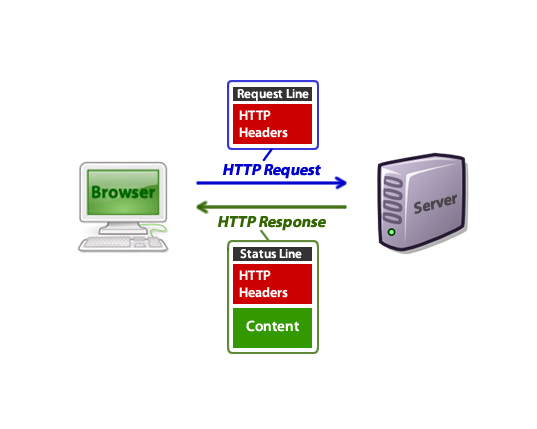
AJAX
Originally the only way an HTTP request could be initiated was if the user clicked a link on a webpage, or submitted a form. AJAX allows JavaScript to send requests to the server with or without user interaction. This enables page content to be updated dynamically without a full page refresh.
Advantages
Faster - This is the most obvious reason for using to AJAX on your front-end: AJAX allows easier and quicker interaction between user and website as pages are not reloaded for content to be displayed. The server doesn't have to get data, render HTML, and then spit it out, it just has to get data and your already-loaded front-end does the rest.
Compact - With AJAX, several application features can be handled using a single web page. That means we modularize our app into smaller bits, and it becomes easier to work on.
Backend Separated from Front-end - Applications that use AJAX-heavy front-ends means developers don't have to work on both sides of the stack at the same time. Some developers can be dedicated to building an API that just serves data, and others can focus on consuming that data and building interfaces.
Disadvantages
The back and refresh button are rendered useless - Since things are loaded dynamically on a page, without that page reloading (or more importantly a URL being changed), clicking the back or refresh button don't work the way you're used to. That's actually a pretty big deal – UX designers are very familiar with the fact that users are accustomed to being able to hit back when they need to. Some advanced front-end frameworks have tried to solve this issue with clever workarounds, but that's not always the case and not always accurate.
Javascript can be disabled - While javascript is secure and has been heavily used by websites for a long period of time, a percentage of website surfers prefer to turn javascript functionality off on their browser, rendering the AJAX application totally useless. That's not always the best thing to design for, and more often than not, you'll find yourself assuming users have JS on, but it's important to know your whole site could be useless in some situations.
You have to consider the UX even more - While UX is crucial for any application, the fact that a page doesn't refresh means you have to be even more considerate of what a user is experiencing. If something in your JavaScript goes wrong, your AJAX breaks, and you don't have failsafes thoughtfully built in, your user might be clicking a button and seeing absolutely nothing happen. Most common users won't have their consoles open to notice any errors.
AJAX in jQuery
For information about AJAX in jQuery, the best place to go is the jQuery AJAX Documentation.
The most common methods are $.get() and $.post(). There's also a method called $.ajax(), which allows additional options to be passsed to the request.
To make our AJAX request, we have to tell the server what we want in our HTTP request. This is done by passing in an object.
Basic $.get() example
$.get('https://www.reddit.com/search.json', {
  q: 'kittens'
}).done(function(data) {
  console.log(data);
});
This $.ajax() example is the same as the $.get() example above
$.ajax({
  url: 'https://www.reddit.com/search.json',
  method: 'GET',
  data: {
    q: 'kittens'
  }
}).done(function(data) {
  console.log(data);
});
Note how in the $.ajax() example, we need to be more explicit by providing an object with the url, method, and data. Using $.get() will assume that the first argument is the URL and the second argument is data we want to send via the query string.
AJAX is asynchronous
An AJAX request doesn't allow you to load things instantly. Requesting things over the network always takes time, and you need an event handler to deal with the results. Look at the following code:
console.log('Document is ready');

$.get('https://www.reddit.com/search.json', {
  q: 'kittens'
}).done(function(data) {
  console.log('AJAX is ready');
});

console.log('Just fired AJAX request!');
What order will the console.log statements appear?
AJAX Data and Scope
What if we want to use data from an AJAX request? We'll need to keep variable scope in mind, i.e. where do the variables exist?
Many AJAX requests produce local variables. This means that it can be challenging to use these variables outside of our callback functions
Some examples:
This code causes an error because posts only exists inside the immediate function its declared in
$.get('https://www.reddit.com/search.json', {
  q: 'kittens'
}).done(function(data) {
  var posts = data;
});

console.log(posts);

// Output
// > Uncaught ReferenceError: posts is not defined(…)
This code runs because posts is declared in the same scope as data.
$.get('https://www.reddit.com/search.json', {
  q: 'kittens'
}).done(function(data) {
  var posts = data;
  console.log(posts);
});

// Output
// > Object {kind: "Listing", data: Object}
Promises
Note that at the end of the AJAX request, there is a function called .done() that is called once the response has been received. This is an example of a promise. Promises are common concepts in JavaScript, and you can think of promises as a "contract" between two functions. When the .done() promise is attached to the AJAX function, it "promises" to run once the response comes back successful. This is due to the request-response cycle taking time, and requiring asynchronous behavior.
We can chain additional promises to the AJAX request, and this is a common practice. However, the "contract" still applies. Let's see an example.
$.get('https://www.reddit.com/thispagedoesntexist').done(function(data) {
  console.log('This should not run, because a 404 error occurs');
}).fail(function(error) {
  console.log('An error occurred');
});
Here, we added a second promise called .fail(). Try running the code above by pasting it into the Chrome console on https://www.reddit.com, and see what happens. Only the .fail() function runs, and that's because the .fail() function makes a promise to the AJAX function that it will only run when there's an error.
Since the .done() function made a promise to the AJAX function to only run when successful, the .done() function does not run, thus keeping its promise. Keep a lookout for promises implemented in the context of AJAX and other libraries.
APIs to hit
Here are a few APIs you can use to practice AJAX calls. They either won't save changes, or won't allow you to use POST, PUT or DELETE, so they're safe to play with.
Cross-Origin Requests
Note that not all websites/APIs play nice with AJAX. You may see an error in the console from APIs like the iTunes API
$.get('http://itunes.apple.com/search?term=arcade+fire').done(function(data) {
  console.log(data);
});

// output
// > No 'Access-Control-Allow-Origin' header is present on the requested resource.
For security reasons, browsers often restrict requests to other websites other than your own. However, some APIs like Reddit configure their servers to allow these types of requests. The browser will know to not restrict requests because the server will send back additional information in a header. Here's an example of the information sent back:
HTTP/1.1 200 OK
Date: Wed, 27 Jan 2016 19:44:30 GMT
Content-Type: application/json; charset=utf-8
Content-Length: 641
Connection: keep-alive
Set-Cookie: __cfduid=df8b7d51a2307f3b7bf782d1ce5d060011453923870; expires=Thu, 26-Jan-17 19:44:30 GMT; path=/; domain=.doughnuts.ga; HttpOnly
X-Powered-By: Express
Vary: Origin
Access-Control-Allow-Credentials: true
...
The header names sometimes vary, but because the Access-Control-Allow-Credentials was sent back by the server, the browser will let us receive data from this cross-origin request.
AJAX in Vanilla JavaScript
Plain old JavaScript has its own way of performing AJAX calls. It might not be as elegant as jQuery, but they're still relatively simple. This is done by
- creating an
XMLHttpRequestobject (XHR) - attaching the appropriate event listeners to it
- specifying the method and target
- performing whatever other configurations you need
- sending the request
var oReq = new XMLHttpRequest();
oReq.addEventListener("load", reqListener);
oReq.open("GET", "http://www.example.org/example.txt");
oReq.send();