HTML CSS
Objectives
- Construct a HTML page with common elements and attributes
HTML Recap
Front-end or Client-side web development is dominated by 3 'languages' HTML, CSS and Javascript. You will use these all the time. HTML is about defining the structure or a document. CSS is about the design and presentation of it, and Javascript is about control the behaviours of it. We'll cover all three but first let's focus on HTML.
What is HTML?
Stands for Hyper Text Markup Language
Currently at Version 5 (as of October 2014)
Made up of tags (opening and closing usually), which in turn create elements
<!-- This whole thing is an element -->

<tagname attribute="attribute_value"></tagname>

<!-- A paragraph tag with two classes, could be selected in CSS using p.default-paragraph.another-class {} -->

<p class="default-paragraph another-class">Some content in here</p>
What does an HTML document need?
<!doctype html> <!-- Always have this - it describes which version of HTML you are using -->

<html lang="en">

<head>

<!-- This is the meta data of the page, often invisible -->

<meta charset="utf-8">

<title>This is a Web Page</title>

</head>

<body>

<!-- This is where the actual content is -->

</body>

</html>
Common Elements
<!-- Heading Tags - getting less important the higher the number -->

<h1></h1>

<h2></h2>

<h3></h3>

<h4></h4>

<h5></h5>

<h6></h6>

<p></p> <!-- A paragraph tag -->

<!-- An HTML element can have attributes. Attributes are key value pairs (just like javascript objects) that provide additional information. They look like this. -->

<a href="generalassemb.ly">General Assembly</a>

<img src="" />

<video src=""></video>

<br /> <!-- a new line -->

<hr /> <!-- a horizontal line -->

<button></button>

<input />

<pre></pre> <!-- Preformatted text -->

<code></code>

<textarea></textarea>

<ul> <!-- Unordered list -->

<li></li> <!-- List item -->

</ul>

<ol> <!-- Ordered list -->

<li></li>

</ol>

<div></div> <!-- A division, this is just a way to group content -->

<section></section>

<article></article>

<aside></aside>

<header></header>

<footer></footer>

<main></main>

<nav></nav>

<!-- etc. -->

`
DOM (Document Object Model)
One last point we shall mention briefly is the DOM or Document Object Model. The DOM is technically an API for representing and interacting with elements in HTML. The easiest way to think about this is that HTML is the language we used to describe what we want, the DOM is the object created to then represents that in memory, in a tree like structure. Later we'll talk about manipulating the DOM and what we mean is changing the structure of the pages we defined in out HTML.
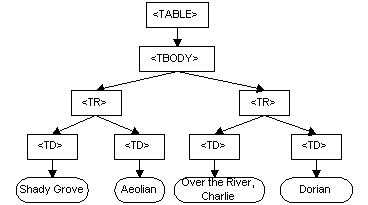
For more information, see here.